
How to Calculate the ROI of AI-Driven Software Delivery
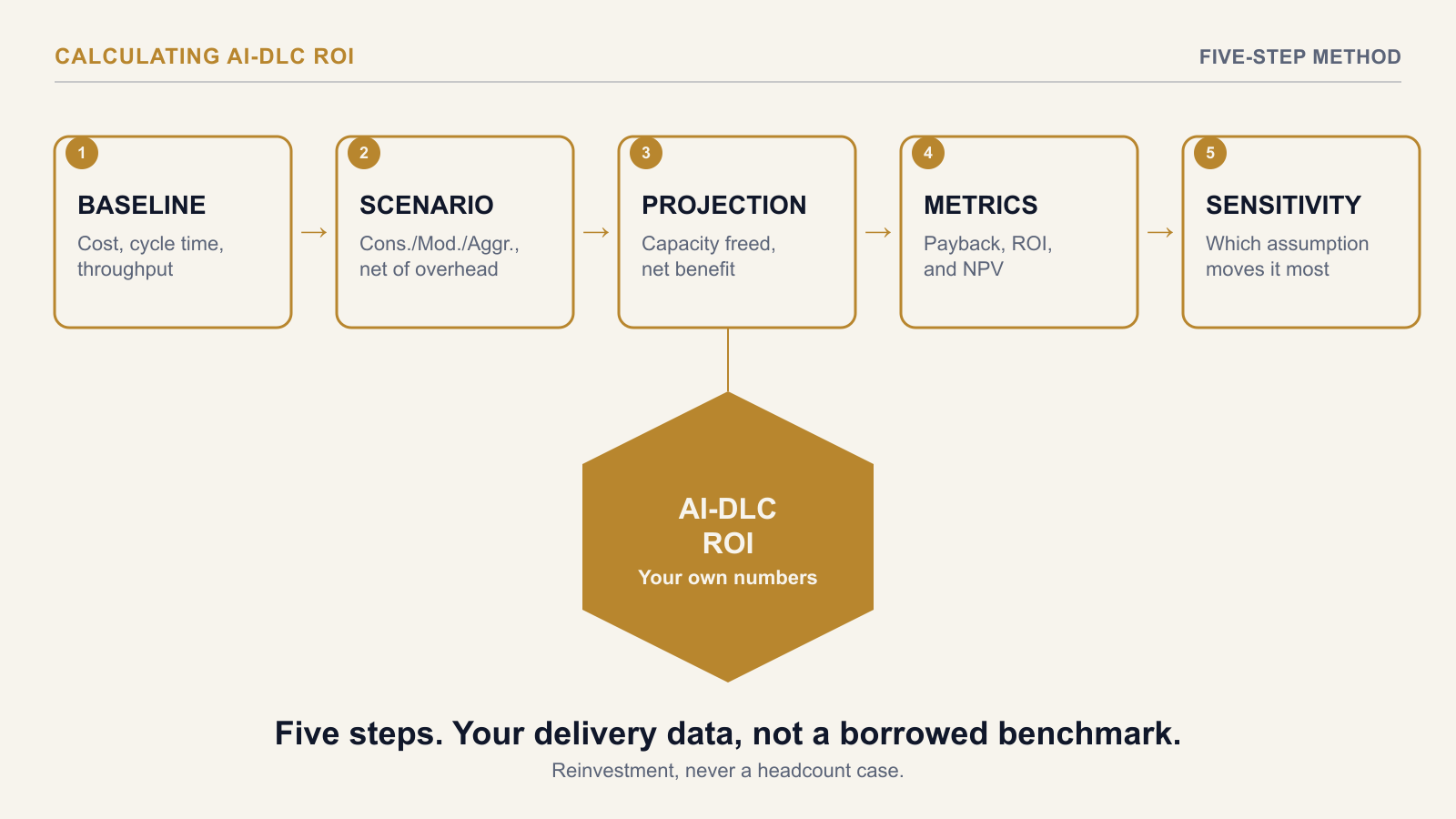
To calculate the ROI of AI-driven software delivery, start from this team's own current-state delivery costs — not a vendor's published productivity multiple — apply a Conservative, Moderate, or Aggressive productivity scenario net of coordination overhead to each affected development activity, project the capacity freed and net annual benefit, and calculate payback period, Year-1 ROI, and NPV from the result. The output is a business case built on this organisation's numbers, not a borrowed case study.
Why Start From Your Own Baseline
Publicly reported AI-DLC productivity figures, including early case studies citing double-digit gains, describe someone else's delivery organisation — their codebase, their task mix, their review process. A calculation built on a borrowed multiplier collapses the first time a CFO asks how it applies here. The fix is mechanical: replace the borrowed number with this team's own cost-centre and delivery-tooling data before any multiplier gets applied.
Step 1: Baseline the Current State
Pull team composition, fully-loaded cost, cycle time, throughput, and time allocation across SDLC activities from actual finance cost-centre data and delivery tooling — not from headcount estimates or a manager's sense of how things are going. This baseline is the number every later step gets compared against, so it needs to be sourced, not guessed.
Step 2: Apply a Productivity Scenario, Net of Overhead
Break the work into the SDLC activities AI assistance actually touches, and apply a Conservative, Moderate, or Aggressive multiplier to each one individually rather than one blanket multiplier across all delivery work — a multiplier that holds for boilerplate code rarely holds for novel logic design in the same proportion. Critically, net each multiplier against coordination overhead before it reaches the calculation: structured review cycles built specifically because AI-generated output needs a different review posture, plus the planning and ritual time a mob-style workflow adds, both reduce the raw speed gain before it becomes a benefit figure. A raw multiplier applied without this adjustment overstates the case from the first line of the calculation.
Step 3: Project Capacity Freed and Net Annual Benefit
With the net-of-overhead multiplier applied per activity, the projection produces two figures: capacity freed (time no longer needed for the same output, valued at the team's fully-loaded cost) and compressed cycle time. Both should be presented explicitly as a reinvestment figure — more throughput, more scope delivered inside the same headcount — not a redundancy case. Using freed capacity to justify a headcount reduction misrepresents what the calculation measures and damages trust with the engineers whose careful review work the net-benefit figure depends on.
Step 4: Calculate Payback, Year-1 ROI, and NPV
With net annual benefit established, three figures answer the questions a steering committee will actually ask. Payback period: the number of months until cumulative net benefit equals the transition investment (tooling, onboarding, process change). Year-1 ROI: net benefit in the first year as a percentage of that transition investment. NPV: net benefit over the full analysis horizon, discounted at this organisation's own cost of capital — not a generic default rate, since the discount rate materially changes the result and finance will ask which rate was used.
Step 5: Run the Case Across All Three Scenarios, Not Just One
Calculate payback, Year-1 ROI, and NPV for the Conservative, Moderate, and Aggressive scenarios side by side, then identify which single assumption moves the result the most. A business case presented as one number, with no visibility into what happens if the productivity assumption is wrong, invites exactly the question it has no answer for: what if we're wrong about the multiplier. Presenting the range, and naming the assumption the case is most exposed to, answers that question before it's asked.
A Hypothetical Worked Example
Picture a 12-person delivery team with a fully-loaded annual cost around $1.8M, baselined from cost-centre data. Applying Moderate, net-of-overhead multipliers across code generation, test scaffolding, and documentation — the three activities where AI assistance shows the clearest net gain for this hypothetical team — produces a projected capacity-freed figure equivalent to roughly two FTEs, reinvested into additional feature throughput rather than reduced headcount. Weighed against a transition investment covering tooling, onboarding, and the initial process change, the Moderate scenario produces a payback period inside a year and a positive multi-year NPV; the Conservative scenario still clears payback, just later. Neither number is this team's real result — that depends on how the transition actually goes — but calculated this way, before the transition starts, the range tells leadership what's plausible and what the case is most sensitive to.
Where This Differs From "Is the Tool Worth It"
A related, narrower question — whether a specific AI coding tool's bill is worth what it frees, net of the overhead it adds — is covered in Are AI Coding Tools Worth the Token Bill? Testing the Business Case. That post tests one tool's net benefit against its cost. This post is the fuller calculation behind an AI-DLC transition business case as a whole — baseline, scenario, projection, and the payback/ROI/NPV figures a steering committee actually asks for.
The AI-DLC ROI & Business Case Model provides a 6-tab Excel workbook that runs this exact calculation from your own inputs — a current-state baseline tab, Conservative/Moderate/Aggressive productivity scenarios net of mob-ritual overhead, and an auto-calculated payback period, Year-1 ROI, and multi-year NPV on a print-ready dashboard.
→ Available at www.viksya.com